Create Subaccounts
Use subaccounts to programmatically spin up crypto wallet addresses for any customer, partner, or business entity on your platform. Each subaccount can hold multiple currencies across multiple networks.
Subaccount creation must happen server-side — it requires your Secret API Key, which should never be exposed in browser or client-side code.
Using the 100pay.js SDK
Install
npm
npm install @100pay-hq/100pay.jsCreate a Subaccount
Initialize the Client
Import and configure the Pay100 client with your Secret API Key. This must only run on the server (e.g. in a Next.js API route, Express handler, or similar).
import { Pay100 } from "@100pay-hq/100pay.js";

const client = new Pay100({
  publicKey: "your_public_key",
  secretKey: "your_secret_key", // Required for server-side operations
});
Call subaccounts.create()
const subaccount = await client.subaccounts.create({
  symbols: ["BTC", "ETH", "USDT"],   // Cryptocurrencies to generate wallets for
  networks: ["ethereum", "bsc"],      // Blockchain networks (lowercased automatically)
  owner: {
    name: "Partner Store",
    email: "partner@example.com",
    phone: "+1234567890",
  },
  metadata: {
    storeId: "store-123",            // Your internal identifier
    region: "US",
  },
});

console.log(subaccount.accounts);
// => Array of wallet accounts, one per currency/network combination
Network names are automatically lowercased by the SDK before the request is sent.
Parameters
CreateSubAccountData
| Field | Type | Required | Description |
|---|---|---|---|
symbols | string[] | ✅ | Cryptocurrency symbols to create wallets for (e.g. ["BTC", "ETH", "USDT"]) |
networks | string[] | ✅ | Blockchain networks to target (e.g. ["ethereum", "bsc", "sol"]) |
owner.name | string | ✅ | Display name of the subaccount owner |
owner.email | string | ✅ | Email address of the owner |
owner.phone | string | ✅ | Phone number of the owner |
metadata | object | — | Arbitrary key/value pairs for your own reference (e.g. storeId, region) |
Response
A successful response returns a CreateSubAccountResponse with an array of accounts, one entry per currency/network combination.
{
  "message": "successful",
  "accounts": [
    {
      "balance": {
        "available": null,
        "locked": null
      },
      "accountType": "subaccount",
      "walletType": "crypto",
      "status": "active",
      "_id": "69a...59e",
      "name": "Tether USDT",
      "symbol": "USDT",
      "decimals": "18",
      "account": {
        "address": "0x15f14bFC3...5CD", // The deposit wallet address
        "network": "bsc"
      },
      "contractAddress": "0x55d3...955",
      "logo": "https://res.cloudinary.com/estaterally/image/upload/v1644943779/coins/usdt_imbfgw.jpg",
      "userId": "680...cf5",
      "appId": "69a...345",
      "network": "bsc",
      "metadata": {
        "userId": "69a...db4",
        "createdVia": "demo-app-wallet-setup"
      },
      "ownerId": "66bf...ff3a",
      "parentWallet": "69a...59c",
      "createdAt": "Tue Mar 03 2026 22:39:39 GMT+0100 (West Africa Time)",
      "updatedAt": "Tue Mar 03 2026 22:39:39 GMT+0100 (West Africa Time)",
      "__v": 0
    },
    // ...one entry per symbol × network
  ]
}
Account Object
| Field | Type | Description |
|---|---|---|
_id | string | Unique account ID |
name | string | Human-readable currency name (e.g. "Tether USDT") |
symbol | string | Currency ticker (e.g. "USDT") |
network | string | Blockchain network (e.g. "bsc", "ethereum") |
status | string | Account status — typically "active" |
accountType | string | Always "subaccount" |
walletType | string | Always "crypto" |
account.address | string | The crypto deposit address for this wallet |
balance.available | number | null | Available balance |
balance.locked | number | null | Locked/pending balance |
decimals | string | Token decimal precision |
contractAddress | string | Smart contract address (for tokens) |
ownerId | string | ID of the subaccount owner |
appId | string | ID of your 100Pay application |
TypeScript Types
type CreateSubAccountData = {
  symbols: string[];
  networks: string[];
  owner: {
    name: string;
    email: string;
    phone: string;
  };
  metadata: Record<string, unknown>;
};

type CreateSubAccountResponse = {
  message: string;
  accounts: Account[];
};

type Account = {
  _id: string;
  name: string;
  symbol: string;
  network: string;
  status: string;
  accountType: string;
  walletType: string;
  decimals: string;
  contractAddress: string;
  logo: string;
  userId: string;
  appId: string;
  ownerId: string;
  parentWallet: string;
  account: {
    address: string;
    network: string;
  };
  balance: {
    available: number | null;
    locked: number | null;
  };
};
Creating Subaccounts on the Dashboard
You can also create and manage subaccounts directly from the 100Pay dashboard, where they are referred to as Customers.
Navigate to dashboard.100pay.co/customers to see all subaccounts you’ve created.
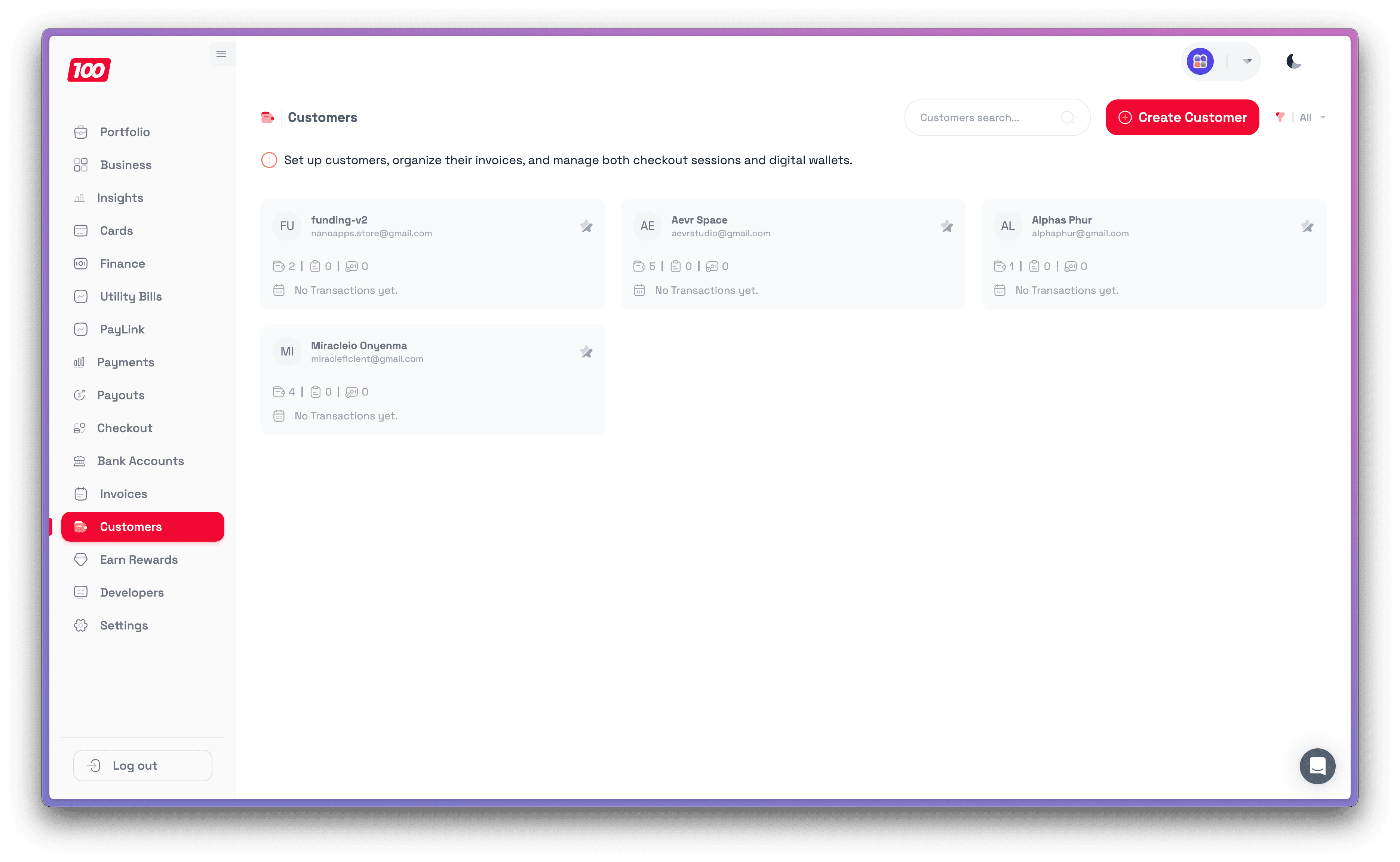
Click Create Customer and fill in the details:
| Field | Description |
|---|---|
| Customer Name | Display name for the subaccount owner |
| Customer Email | Owner’s email address |
| Customer Phone Number | Owner’s phone number |
| Crypto Currency | Select currencies to generate wallet addresses for (e.g. PAY, BTC, USDT) |
| Networks | Choose the blockchain networks (e.g. bsc, sol, ethereum) |
| Custom Fields | Optional key/value pairs — useful for tagging or referencing the customer in your system |
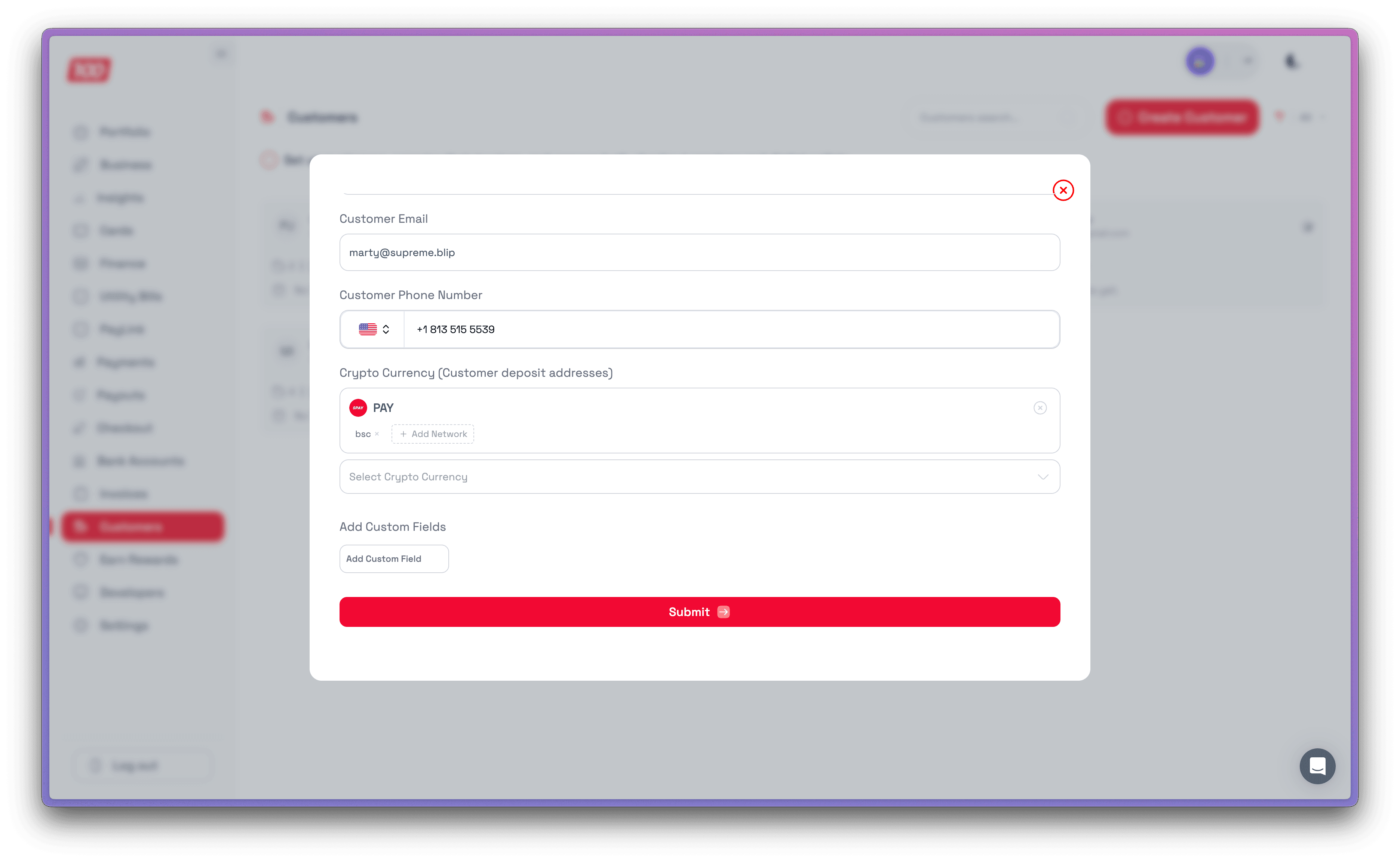
Once created, click on any customer to view their details, wallet addresses, invoices, and checkouts.

Next Steps
- Check Balances & Track Payments — monitor incoming deposits to subaccount wallets
- Payments Overview — accept payments with Checkout, Payment Links, and Invoices